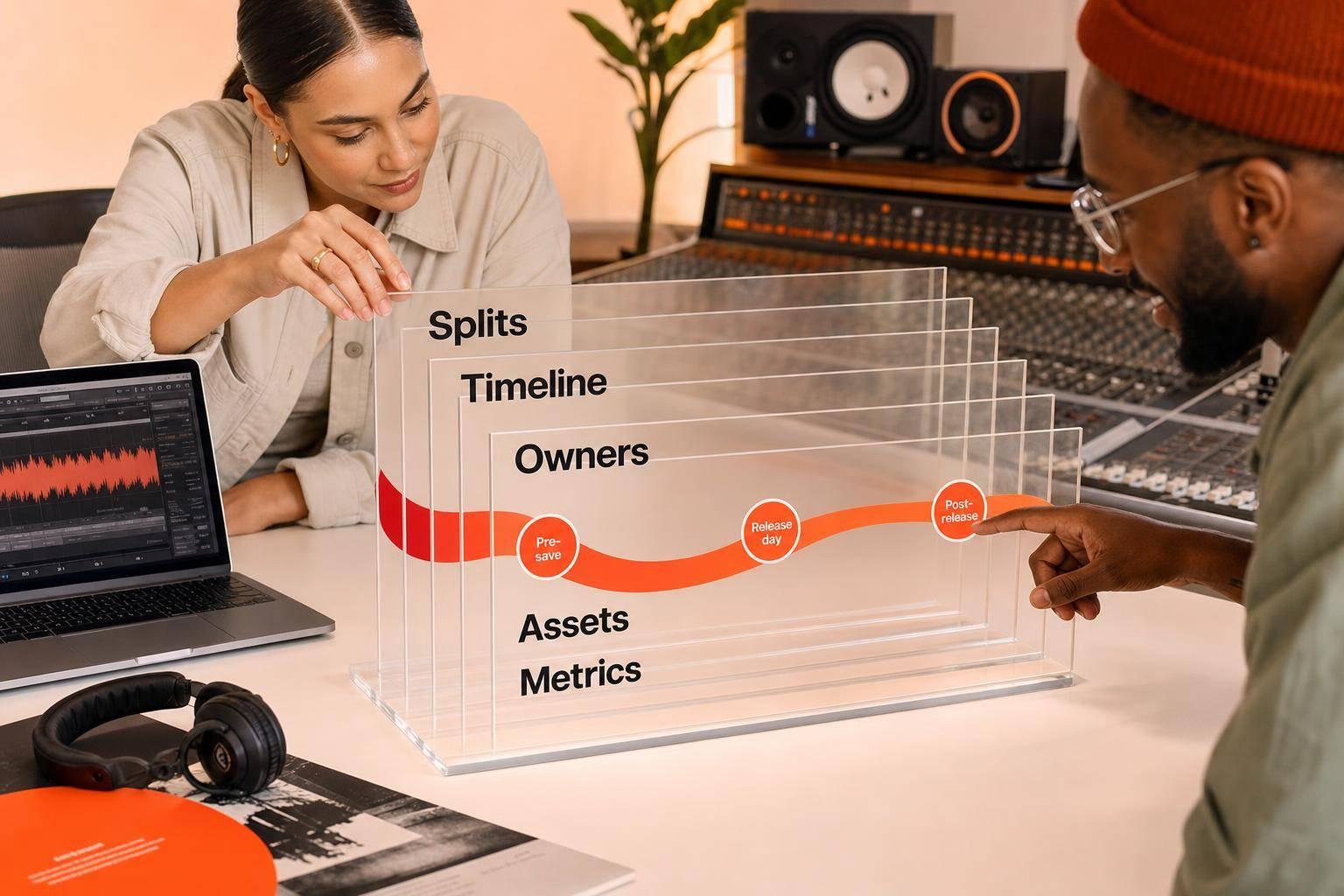
Most music collabs fail for simple reasons: unclear splits, mixed approvals, and no shared timeline. If I want a joint release to work, I need to lock rights first, pick the right partner, assign one owner per task, and track results from pre-save to post-release.
Here’s the short version:
- Start with one goal. I need to decide if the campaign is for audience growth, lower costs, ticket sales, social activity, or fan response.
- Pick the right collab type. Features, remixes, co-releases, split singles, and cross-promo each fit a different goal.
- Set terms before promo starts. That means master splits, publishing splits, credits, billing order, approvals, budget control, and posting rights.
- Use one calendar. Most joint releases work best with a 6–8 week pre-release window and 4–6 weeks after launch.
- Give each task one owner. Label, artist, manager, and publicist each need clear jobs so no one duplicates work.
- Keep one approved asset folder. Artwork, links, captions, video cuts, metadata, and press files should all live in one place.
- Track every channel. Pre-saves, open rates, clicks, downloads, first-week streams, saves, and press pickups show what is working.
- Keep pushing after release. The first 24–48 hours matter, but follow-ups, milestone posts, remixes, and fan clips often extend the life of the campaign.
A few numbers stand out:
- Upload music 4–8 weeks before release
- Pitch Spotify editorial about 3–4 weeks out
- Launch pre-save links about 3–4 weeks before release
- Review results daily during launch week, then weekly after that
Quick Comparison
| Collaboration format | Best use | Main metric |
|---|---|---|
| Feature or remix | Reach new listeners | Streaming lift, monthly listeners |
| Co-release | Split cost and workload | Spend vs. results |
| Split single | Share release costs around one track | Pre-saves, merch sales |
| Co-hosted event | Drive fan turnout | Ticket sales, attendance |
| Social cross-promo | Boost social response | Follower growth, shares |
My takeaway: a strong collaborative music campaign is less about hype and more about clear paperwork, one plan, one asset system, and clean reporting. If I set those pieces up early, I give the release a much better shot.
sbb-itb-888513b
Choose the Right Partner and Lock the Terms Early
Evaluate Partner Fit by Audience, Activity, and Promo Value
The biggest mistake in partner selection is chasing follower counts. Engagement matters more. A big audience looks nice on paper, but if people aren’t listening, commenting, or sharing, that number doesn’t help much.
Instead, look at audience overlap, release consistency, and follow-through. Spotify’s "Fans also like" is a fast way to check whether your audiences line up. It’s not fancy, but it gives you a solid gut check. If the crossover isn’t there, the collab can feel forced.
Activity matters too. Partners who put out music on a steady schedule often keep better release momentum. If someone disappears for months at a time or only drops music now and then, that’s a warning sign. In many cases, those same gaps show up later as missed deadlines, slow replies, or last-minute changes.
Promo effort matters just as much as audience size. Before you lock anything in, confirm that the partner will support the release with scheduled posts, links, and content on their own channels – not just add their name to the credits. If someone says they’ll “post later” but won’t commit to dates, that can turn into a headache right when the release needs the most push.
| Criteria | Strong Partner Fit | Red Flag |
|---|---|---|
| Audience | Clear overlap in "Fans also like" | Large following, no genre crossover |
| Engagement | Active comments and real interaction | High follower count, low likes/comments |
| Release Consistency | Music every 4–6 weeks | Sporadic or inactive release history |
| Promo Value | Commits to pre-saves and posts on schedule | Reluctant to post or vague about timing |
| Values | Shared artistic vision and themes | Misaligned brand image |
Agree on Credits, Splits, and Decision Rights
Even a strong partner fit can fall apart if approvals and timing are fuzzy. Once you know the fit is right, put the terms in writing. Don’t leave this stuff to text threads and memory.
A split sheet should cover royalty allocations, neighboring rights, billing order, and credits. Also check that billing order and credits are entered the right way in the distributor dashboard, so the release shows up correctly across platforms.
Money is only part of it. You also need clear decision rights. Spell out who has final say on artwork, captions, campaign timing, and any content that needs review before release. That saves a lot of back-and-forth when things get busy.
It also helps to put posting schedules in the agreement itself. Use specific dates and times, not loose windows. If the label, publicist, or manager is handling different parts of outreach, define those lanes clearly. Assign exact post dates, times, and outreach owners so contacts don’t overlap.
Once the terms are locked, build the week-by-week release plan.
Build the Campaign Timeline and Assign Responsibilities
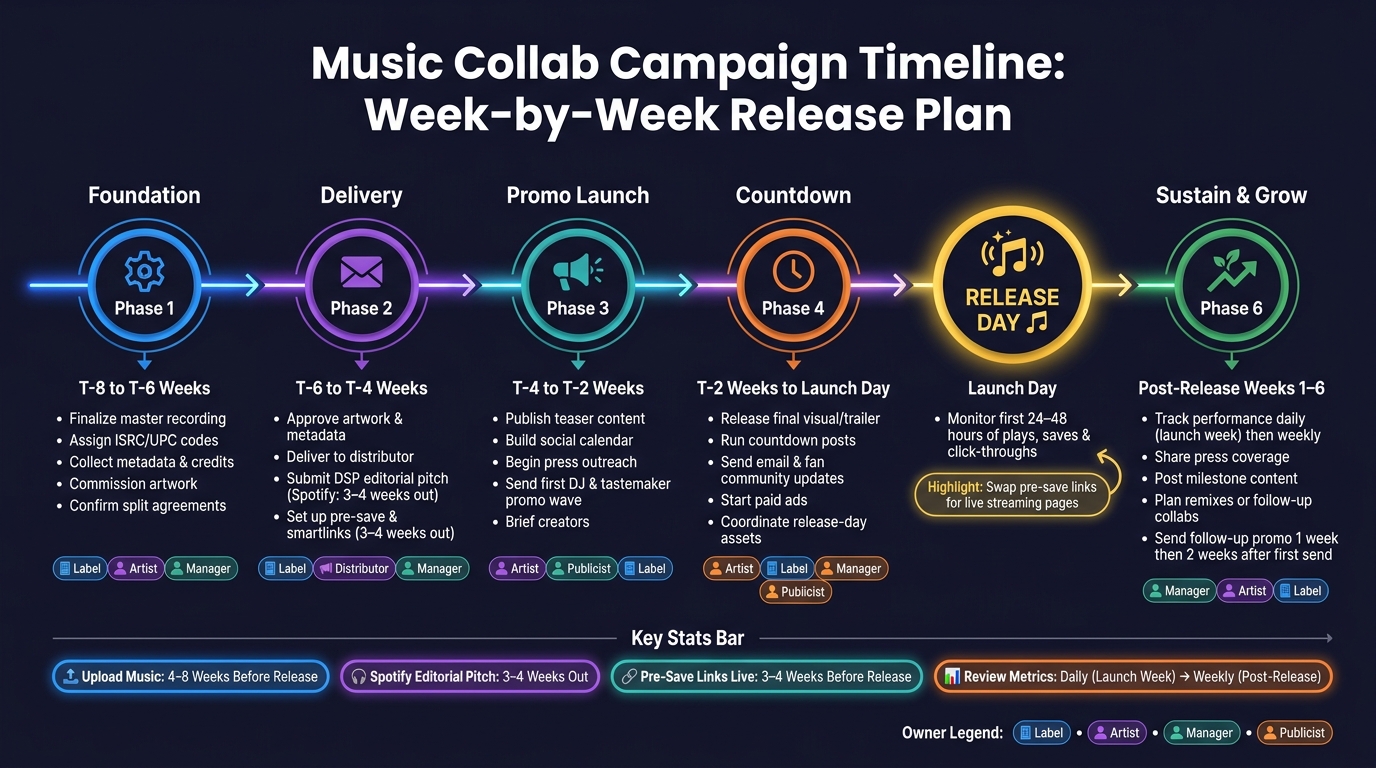
Music Collab Campaign Timeline: Week-by-Week Release Plan
Collaborative campaigns fall apart fast when each team is working from a different calendar. The fix is simple: use one shared timeline and give every task one clear owner before promo begins. Start with the release date, then build backward.
Week-by-Week Release Plan from Setup to Launch Day
Work backward from the release date. First, lock the master, artwork, metadata, and rights details. Then stack promo tasks week by week. For most collab releases, a workable timeline starts 6–8 weeks before release and runs for 4–6 weeks after launch.
| Week | Key Milestones | Primary Owner |
|---|---|---|
| T-8 to T-6 | Finalize the master; assign ISRC/UPC; collect metadata, credits, and split information; commission artwork; confirm campaign deliverables and approval deadlines | Label / Artist / Manager |
| T-6 to T-4 | Approve artwork and metadata; deliver to the distributor; confirm distributor delivery and store submission; submit the DSP editorial pitch; set up pre-save links and smartlinks | Label / Distributor / Manager |
| T-4 to T-2 | Publish teaser content; build the social calendar; begin press outreach; send the first DJ and tastemaker promo wave; brief creators | Artist / Publicist / Label / Manager |
| T-2 to Launch Day | Release final visual or trailer content; run countdown posts; send email and fan community updates; start paid ads; coordinate release-day assets | Artist / Label / Manager / Publicist |
| Post-Release (Weeks 1–6) | Track performance; share press coverage; keep social content going; celebrate milestones; plan remixes or follow-up collaborations | Manager / Artist / Label |
Most distributors suggest uploading the release 4–8 weeks before launch so there’s time to catch and fix metadata problems. Spotify editorial pitching tends to work best 3–4 weeks out, while the minimum technical window is 7 days. Pre-save campaigns should usually go live about 3–4 weeks before release.
Roles for Label, Artist, Manager, and Publicist
Once the timeline is locked, assign one owner per task. No shared ownership. No vague handoffs. If everyone owns it, no one owns it.
Here’s the basic split:
- Label: distributor communication, metadata, DSP pitching, paid ads, and reporting
- Artist: teaser content, fan engagement, and direct pre-save promotion
- Manager: timeline control, partner outreach, and approval flow
- Publicist: press outreach, follow-ups, and coverage tracking
The next problem is duplicate work. One person emails the same outlet twice. Someone posts old artwork. A deadline slips because each team thought someone else had it. That’s why every owner should be tracked in one shared document, with deadlines reviewed every week.
Coordinate Assets, Channels, and Campaign Tracking
Once ownership is clear, the next thing that can go wrong is simple: people use different files, different links, and different timing.
That’s how campaigns get messy. A partner uploads old artwork. Someone shares a broken smartlink. Another person posts a graphic that looks wrong on mobile. Those aren’t big artistic problems. They’re coordination problems.
After the timeline is locked, keep every approved asset in one folder. That way, everyone pulls from the same source.
Build One Shared Asset Package for Every Channel
Set up one shared folder that the label, lead artist, co-artist, manager, and publicist can all access. Inside it, use subfolders for artwork, audio, video, social graphics, press materials, email assets, metadata, and event graphics.
The point is simple: one approved folder means one version of the campaign. No outdated art. No off-message copy. No guessing.
Be strict with specs. Cover art should be 3,000 × 3,000 px in RGB as a JPEG or PNG, with no URLs, social handles, or pricing text. For video, export a watermark-free 9:16 master first. Then make square and 4:5 crops for feed posts and Stories. Don’t stretch one design across every platform and hope it works. Build each size for the place it’s going.
Once the package is approved, every channel should use it. This table shows who handles what, so work doesn’t get duplicated and nothing gets missed:
| Channel | Label | Lead Artist | Co-Artist | Manager | Publicist |
|---|---|---|---|---|---|
| Email / Promo | Send DJ and tastemaker promo; manage sender profile and tracking | Provide updated bio and press photo | Provide updated bio and press photo | Confirm send schedule and approvals | Review messaging before send |
| Smartlinks | Generate and update pre-save and streaming links | Add link to Instagram/TikTok bio and YouTube description | Cross-post link to bio; share in newsletters | Confirm links are live before posting | Include link in press kit and pitches |
| Social Media | Post official announcement and high-res artwork | Share short-form video edits; run pre-save reminders | Share behind-the-scenes content; tag all partners | Coordinate posting sequence and timing | Share coverage links and press quotes |
| Press / PR | Distribute press kit; pitch exclusive premieres | Available for interviews or guest features | Available for joint interviews or social takeovers | Coordinate interview scheduling | Lead all press outreach and follow-ups |
| Events | Manage ticket tiers and venue details | Promote show dates to local fanbase | Promote appearance as special guest or co-headliner | Confirm logistics and deadlines | Pitch event to media and listings |
Before launch, set the embargo and posting order. Be specific about who posts first, which time zone sets the schedule, and whether co-artists can post at the same time or need to wait for the label’s announcement.
Track Opens, Plays, Downloads, Pre-Saves, and Feedback
Every campaign link – social posts, promo sends, email sends, and press outreach – should use tags tied to source, partner, and channel. Use the same tag format every time. If naming gets sloppy, reporting gets sloppy too.
For DJ and tastemaker outreach, Promoly can send promo campaigns, collect feedback, and track opens, plays, and downloads in real time.
| Campaign Stage | Key Metrics | What the Data Tells You |
|---|---|---|
| Pre-Release (Weeks 3–4) | Pre-saves, promo open rates, click-throughs | Low opens = weak subject line; low saves = move the CTA higher |
| Launch Week | Smartlink clicks, downloads, conversion rate | Compare pre-save count to first-week streams to measure fan follow-through |
| Post-Release | Plays, DJ feedback ratings, media pickups | Positive feedback becomes social proof for press and future pitches |
| Ongoing Outreach | Reminder engagement, list bounce rate | High bounces = list hygiene needed; low reminder opens = reconsider timing |
Check metrics every day during launch week, then switch to weekly reviews after release. Share a short recap with every partner that shows which channel, partner, and piece of content got the best response. That recap should guide the next push, including which content to reuse and which partners should lead the next round.
Review Results and Extend the Collaboration After Release
Use Post-Release Content and Milestones to Keep Momentum Going
After launch, the job changes. At this stage, stop focusing on scheduling posts and start looking at conversion and retention.
On release day, swap pre-save links for live streaming pages. Then check the first 24–48 hours of plays, saves, and click-throughs. Stick with the same tagged links and channel tracking you used during launch week so the numbers stay easy to compare. In that early window, full plays and saves can tell platform algorithms that the track deserves more reach.
Post-launch updates should reward people who already showed interest. They shouldn’t reopen cold outreach from scratch. Instead of sending a vague follow-up, send something specific: chart movement, a live set placement, or a remix. A good timing window is one week after the first promo send, then a second attempt two weeks later. If someone played several tracks all the way through or downloaded the press kit, move them to the top of the list for a personal note.
Keep post-release content moving by reusing approved assets like:
- behind-the-scenes clips
- joint posts
- fan challenges
As you do that, watch for new followers coming in from the partner’s audience. That’s a simple way to see whether the collaboration reached past your current base.
Once the first reporting cycle is done, document what converted and use those same channels again on the next release.
Conclusion: What Strong Collaborative Campaigns Have in Common
Strong collaborative campaigns usually hinge on three things: clear terms set before any asset goes live, coordinated execution with one owner for each task, and measured follow-through that shows what worked.
Give one person the job of watching results, another the job of handling follow-ups, and another the job of choosing the next content push. That record is what separates teams that learn from teams that just run the same play again.
FAQs
How do I choose the right collaborator?
Prioritize collaborators who match your brand values, musical style, and target audience. The best partnerships feel natural, not forced. When both sides share similar goals and themes, fans are much more likely to connect with the work.
Before you commit, take a close look at their social media presence, audience demographics, and past project performance. You want a partnership that works for both sides, where each person can share resources and co-create content to grow reach.
What should we agree on before promotion starts?
Before you launch a collaborative campaign, get everyone on the same page about shared goals and clear roles. That way, each person knows what success looks like and what they’re responsible for.
It also helps to line up the timeline, outreach plan, and creative direction early. On the admin side, confirm key assets like metadata, ISRC codes, and ownership splits. A little prep here can save you from duplicate work, mixed signals, or disputes later.
How do I measure if a collab campaign worked?
Measure success by looking at actionable engagement across every partner network, not vanity metrics. With Promoly, you can track opens, plays, downloads, save rates, pre-save conversions, and feedback to see how tastemakers and fans responded.
Check results on day 1, day 3, day 7, and day 30. Then compare pre-saves to first-day streams, and use ratings and comments to spot patterns and improve future campaigns.
Leave a Reply